Messages | Version française |


? | Home page | Tutorial | Mixing in practice | Lead guitars

Site de Grebz
Home page


LEAD GUITARS

Reminder: we are working on the song Life, an original composition:


(mp3 file)

Life features two lead guitars playing the same part. However, I recorded both guitar tracks from start to finish; I didn't just copy and paste them. The first guitar is panned to the left and the other to the right. Both guitars were recorded with a Fender Stratocaster plugged directly into an M-Audio AudioBuddy preamp, which was connected to an Edirol FA-101 audio interface. I didn't use a real guitar amp recorded with microphones. Everything was done using amp and cabinet simulation plugins along with various effect plugins.

Here is the complete list of plugins used for the first lead guitar:
* Rea-Gate by Cockos, a free noise gate
* X50 by TSE Audio, a free guitar amp simulator
* LeCab 2 by Poulin, a free IR loader for my cabinet impulses
* EnglPro cabinet impulses from the RedWirez BigBox paid collection ($9 USD per cabinet, with bulk discounts)
* TrackPlug by Wave Arts, a parametric equalizer

Here is the complete list of plugins used for the second lead guitar:
* 808 by TSE Audio, an overdrive pedal simulation
* Harmony by Simple VST, a free guitar amp simulator
* LeCab 2 by Poulin, a free IR loader for my cabinet impulses
* Peavey 5150 cabinet impulses from the RedWirez BigBox paid collection ($9 USD per cabinet, with bulk discounts)
* Rea-Gate by Cockos, a free noise gate
* TrackPlug by Wave Arts, a parametric equalizer

And finally, the plugins applied to the bus where the sounds of the two guitars (previously processed separately) meet:
* FinalPlug by Wave Arts, a limiter
* WizooVerb by Wizoo, a software reverb that has been out of production for several years.

For the paid plugins, I will suggest free alternatives that can be used instead.

Lead Guitar 1 Track - Lead Guitar 2 Track - Lead Guitar Bus

We will now take a detailed look at how the plugins are configured on the tracks and the bus for both guitars.

Mixing in practice : Preparing the session | Bass | Drums | Rhythm guitars | Lead guitars | Synths | Vocals | Mastering
Haut de page

LEAD GUITAR 1

Raw Sound - Noise Gate - Amp Head Simulator - Cabinet Simulator - Equalization

Mono audio track
Panning: 20% left. Lead guitar 2 will be placed symmetrically on the right. Since the sounds of the two lead guitars are different, they will complement each other without blurring in the center, thus freeing up the central space for the bass, vocals, kick, and snare, while the far left and right are reserved for rhythm guitars, cymbals, and two synths.
Volume: 0 dB
The plugins used are chained in this order: noise gate, amp head simulator, cabinet simulator, parametric equalizer.

Lead Guitar 1 Raw Sound

Here is the sound of lead guitar 1 before applying any processing


(mp3 file)

Note that the raw guitar sound is completely masked during the song. I'm including it here to let you hear guitar 1 exactly as it was recorded. A raw guitar sound is interesting in the case of an acoustic guitar recorded with one or more microphones placed in front of it, but the raw sound of an electric guitar isn't particularly useful on its own.

Noise Gate

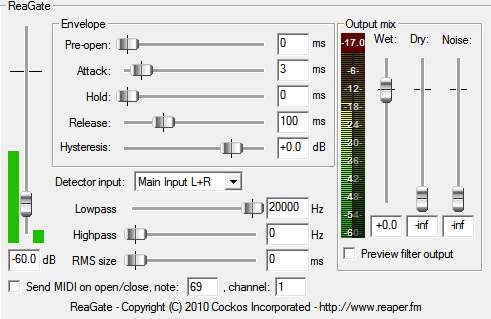
I use this plugin to remove the background hiss of the electric guitar when its volume drops below a certain threshold. The threshold here is -60 dB. If the volume of the lead guitar 1 audio track falls below this threshold, the sound is cut. This plugin is useful because the settings used by the amp simulator chosen for this guitar generate a significant amount of hiss that becomes too audible when no notes are being played. Here are the settings used with the Rea Gate plugin by Cockos:

Rea Gate Plugin
Rea Gate Plugin

Amp Head Simulator

Here is the sound of lead guitar 1 going through an amp head simulator


(mp3 file)

As with real hardware, this sound isn't enough on its own; we'll need to run the signal through a cabinet.

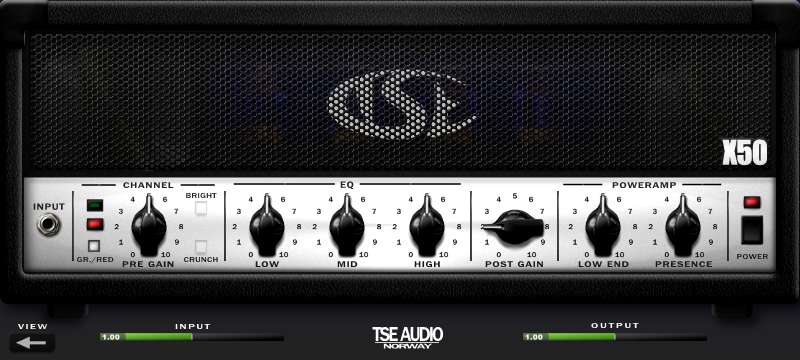
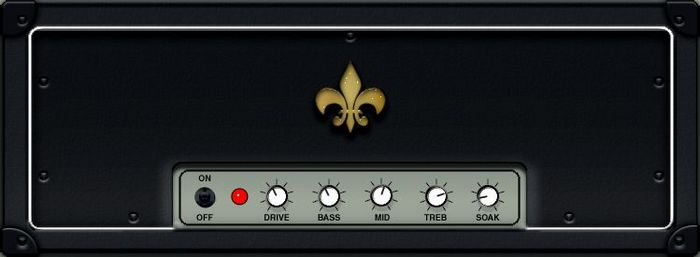
For Lead Guitar 1, I chose the X50 plugin from TSE Audio, one of the best free tube amp simulators. It is available for download here.

Here are the settings used with the TSE Audio X50 plugin (see screenshot below). To complete the sound of this amp simulator, a cabinet simulator still needs to be added.
X50 Plugin
X50 Plugin
X50 Plugin
X50 Plugin

Cabinet Simulator

Here is the sound of lead guitar 1 passing through saturation, an amp head simulator, and a cabinet


(mp3 file)

This sound could stand on its own, but it's very dry. We still need to add a bit of reverb.

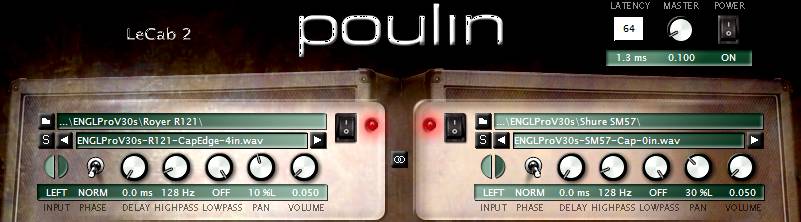
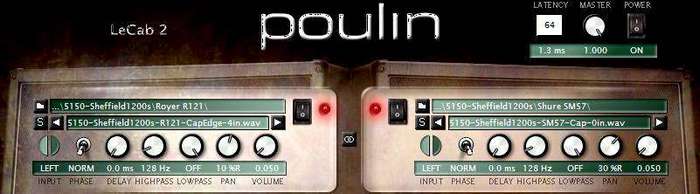
As with real hardware, we now need to connect the amp head (simulated by the X50 plugin) to a cabinet. We'll use the free LeCab 2 plugin by Poulin, into which we'll load impulses. Impulses are "sonic fingerprints" of real cabinets. LeCab 2 allows you to load up to 6 impulses simultaneously. I only used 2 impulses for lead guitar 1, so the screenshot below only shows 2 of the 6 available slots. If you want to download free impulses, you can find some on this page of my site, a bit unorganized... feel free to browse for the ones you need or find others on the web.

Here are the settings used with the Poulin LeCab 2 plugin:

- I used RedWirez impulses, a high-quality paid collection. Specifically, I used impulses from an EnglPro cabinet equipped with Celestion V30 speakers (the real model costs around €1,000 and weighs over 50 kg!).

- First impulse:

- I chose an impulse taken at the speaker's cap edge with a Royer R-121 mic placed 4" from the grill.

- "Phase": Norm (normal). You can choose normal or inverted phase. This helps eliminate phase issues between different impulses, or when combined with "delay," can produce special effects based on the interaction between impulses.

- "Delay": 0 ms. This knob delays the playback of the sound using this impulse (between 0 and 4.6 ms). I don't need it here, so I left it at 0 ms.

- "HighPass": 128 Hz. I set this parameter to attenuate all frequencies below 128 Hz.

- "LowPass": Off. This knob attenuates high frequencies above the chosen frequency. I'm not concerned with it here, so I didn't enable it.

- "Pan": 10% left

- "Volume": set to 0.050, a very low value because the X50 head with these settings sends a very high volume to the cabinet. To avoid unwanted digital clipping, I had to set this volume very low. The plugin's Master volume is also set very low, at 0.1.

- Second impulse:

- I chose an impulse taken at the speaker's cap edge with a Shure SM57 mic placed as close as possible to the grill.

- "Phase": Norm

- "Delay": 0 ms

- "HighPass": 123 Hz

- "LowPass": Off

- "Pan": 30% left

- "Volume": 0.050

- The blend of these two impulses makes up the sound of rhythm guitar 1.
LeCab 2 Plugin
LeCab 2 Plugin
LeCab 2 Plugin
LeCab 2 Plugin

Equalization

Here is the sound of lead guitar 1 processed with an amp, a cabinet, and reverb (in that order) before equalization...


(mp3 file)


And after equalization:


(mp3 file)

The sound of lead guitar 1 will then be sent to the Lead Guitar bus, where it will join the sound of lead guitar 2.

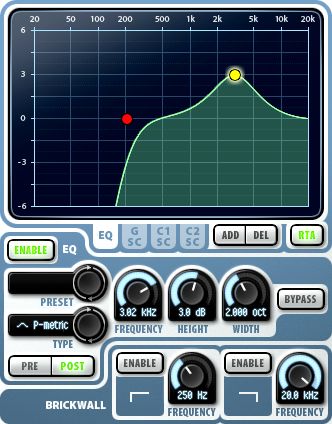
Now we need to sculpt the sound of lead guitar 1 so it fits as well as possible in the mix. I used the TrackPlug plugin from Wave Arts, an excellent paid parametric EQ. As an alternative, you can use Cockos ReaEQ, a free parametric equalizer that allows you to EQ the sound in much the same way as TrackPlug, though it is slightly less feature-rich for certain tasks.

Here are the settings used with the Wave Arts TrackPlug plugin:

- I placed a HighPass band at 200 Hz (red dot) to start rolling off low frequencies from that point.

- However, I boosted 3.02 KHz by 3 dB with a 2-octave width (yellow dot) to better bring out the guitar's mid-range.

- No compression is applied to this guitar for now. A slight boost will be added using a limiter on the Lead Guitar bus.
TrackPlug Plugin
TrackPlug Plugin
Lead guitar 1 frequencies
Mixing in practice : Preparing the session | Bass | Drums | Rhythm guitars | Lead guitars | Synths | Vocals | Mastering
Haut de page

LEAD GUITAR 2

Raw Sound - Amp Head Simulator - Cabinet Simulator - Equalization

Mono audio track
Panning: 90% right
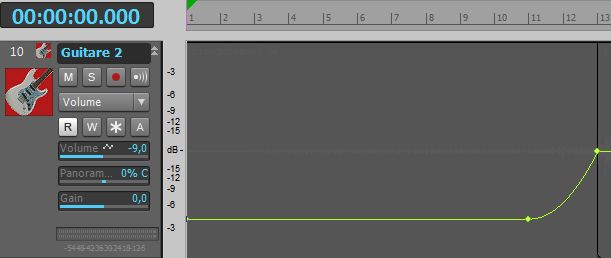
Volume: Variable, as I applied volume automation. From bar 1 to bar 11, the track volume is at -9 dB. From bar 11 to bar 13, I applied a slow exponential curve that rises to 0 dB. The track volume then remains constant at 0 dB. The goal here is to produce a volume swell (fade-in) to create tension and an "announcement" effect. Heads up—the intro is ending, something new is about to happen!
Life - Lead guitar 2 volume automation
Lead guitar 2 volume automation

The plugins used are chained in this order: amp head simulator, cabinet simulator, parametric equalizer.

Lead Guitar 2 Raw Sound

Here is the sound of lead guitar 2 before applying any processing


(mp3 file)

Amp Head Simulator

Here is the sound of lead guitar 2 passing through an amp head simulator


(mp3 file)

As with real hardware, this sound isn't enough on its own; the signal needs to pass through a cabinet.

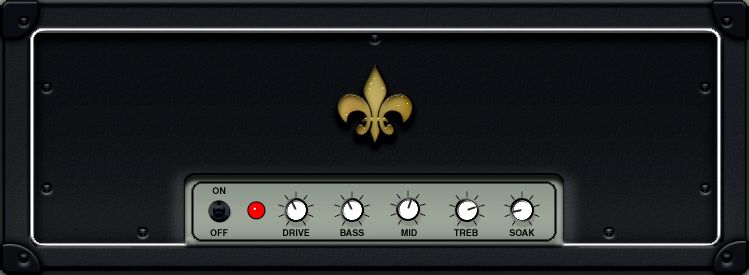
I'm adding an amp head simulator. I chose the Harmony plugin by Simple VST, as its tone complements lead guitar 1 very well. It is available for download here.

Here are the settings used with the Simple VST Harmony plugin (see screenshot below). To complete the sound of this amp simulator, we still need to add a cabinet simulator:
Harmony Plugin
Harmony Plugin
Harmony Plugin
Harmony Plugin

Cabinet Simulator

Here is the sound of lead guitar 2 passing through an amp head simulator and a cabinet


(mp3 file)

This sound could stand on its own, but it's very dry. We still need to add a bit of reverb.

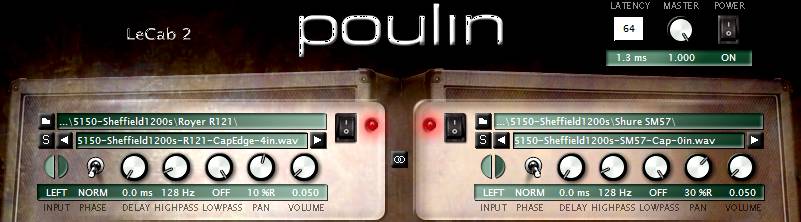
Just like with real gear, the amp head (simulated by the Harmony plugin) must now be connected to a cabinet. We will use the free LeCab 2 plugin by Poulin, into which we will load impulses. Impulses are "sonic fingerprints" of real cabinets. LeCab 2 allows you to load up to 6 impulses simultaneously. I only used 2 impulses for this part, so the screenshot below shows only 2 of the 6 available slots. If you wish to download free impulses, you can find some on this page of my site, though they are a bit unorganized... feel free to search for the impulses you need or find others on the web.

Here are the settings used with the Poulin LeCab 2 plugin:

- I used RedWirez impulses, a high-quality paid collection. For lead guitar 2, I used impulses from a Peavey 5150 cabinet equipped with Celestion Sheffield speakers (the real model is no longer in production but weighs nearly 45 kg!).

- First impulse:

- I chose an impulse taken at the speaker's cap edge with a Royer R-121 mic placed 4" (about 10 cm) from the grill.

- "Phase": Norm (normal). You can choose normal or inverted phase. This can be used to fix phase issues between different impulses or, combined with "delay," to produce special effects that play on the interaction between different impulses.

- "Delay": 0 ms. This knob is used to delay the playback of the sound using this impulse (between 0 and 4.6 ms). I don't need it here, so I left it at 0 ms.

- "HighPass": 128 Hz. I set this parameter to attenuate all frequencies below 128 Hz.

- "LowPass": Off. This knob attenuates high frequencies beyond the chosen frequency. I'm not using it here, so it remains inactive.

- "Pan": 10% right

- "Volume": Set to 0.050, a very low volume, but the plugin's Master volume is set to 1. Given the volume coming from the amp head, this is sufficient here.

- Second impulse:

- I chose an impulse taken at the center of the speaker's dome (cap) with a Shure SM57 mic placed against the grill.

- "Phase": Norm

- "Delay": 0 ms

- "HighPass": 128 Hz

- "LowPass": Off

- "Pan": 30% right

- "Volume": 0.050

- The blend of these two impulses makes up the sound of lead guitar 2.
LeCab 2 Plugin
LeCab 2 Plugin
LeCab 2 Plugin
LeCab 2 Plugin

Equalization

Here is the sound of lead guitar 2 processed with an amp, a cabinet, and reverb (in that order) before equalization...


(mp3 file)


And after equalization


(mp3 file)

The sound of lead guitar 2 will then be sent to the Lead Guitar bus, where it will join lead guitar 1.

Now we need to sculpt the sound of lead guitar 2 so it sits perfectly in the mix. On this track, I used the TrackPlug plugin from Wave Arts, an excellent paid EQ plugin. As an alternative, you can download Cockos ReaEQ, a free parametric equalizer that works much like TrackPlug, though it’s slightly less comprehensive for certain adjustments.

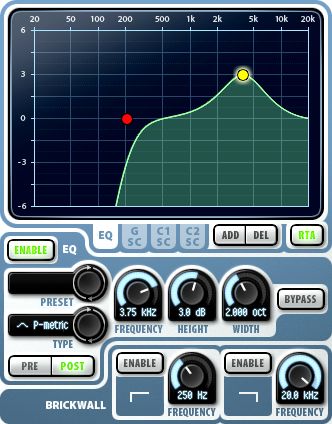
Here are the settings used with the Wave Arts TrackPlug plugin:

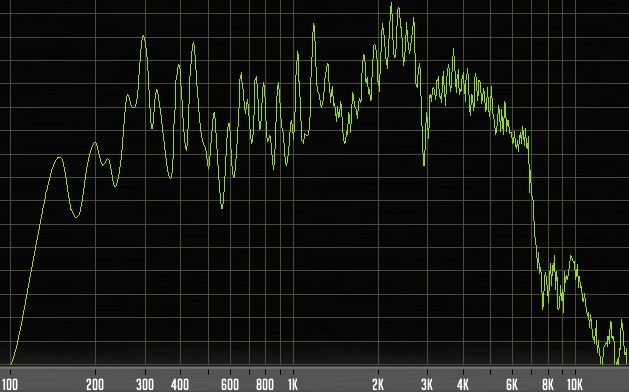
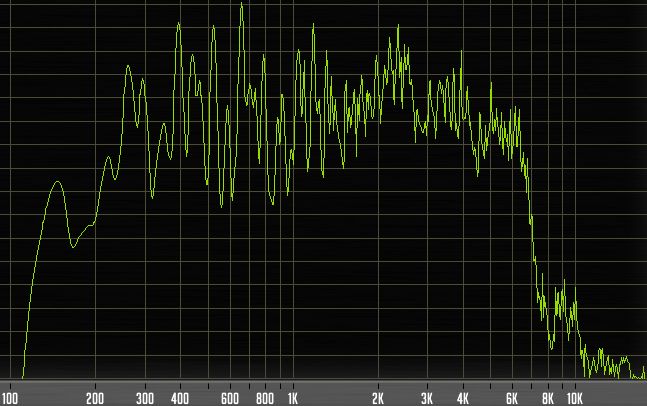
- I placed a HighPass band at 200 Hz (red dot) to start rolling off the low frequencies. You can see further down in the frequency analyzer screenshot that the volume drops rapidly below this frequency, dying out completely around 120 Hz.

- I boosted 3.75 KHz by 3 dB (yellow dot) to help the guitar's mid-range stand out.

- No compression is applied to this guitar for now. A slight boost will be added using a limiter on the Lead Guitar bus.
TrackPlug Plugin
TrackPlug Plugin
Lead guitar 2 frequencies
Mixing in practice : Preparing the session | Bass | Drums | Rhythm guitars | Lead guitars | Synths | Vocals | Mastering
Haut de page

LEAD GUITARS BUS

Here is the sound of the two lead guitars without the limiter...


(mp3 file)


And with the limiter


(mp3 file)

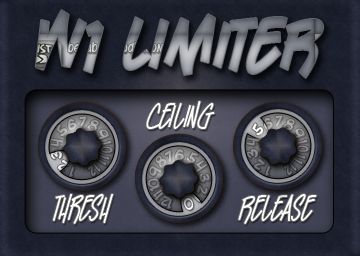
This stereo bus is where the sounds from both lead guitar tracks are summed. Here, I'm using the FinalPlug plugin by Wave Arts, a paid brickwall limiter that boosts the signal to make the guitars more prominent in the track. A brickwall limiter is a type of compressor that prevents the signal from exceeding a set level. If poorly adjusted (with too much compression), it can squash the sound and even cause distortion. When set correctly, it simply adds more "punch" to the audio. As an alternative, you can use George Yohng's W1 Limiter (shown here with the BetaBugsAudio interface), an excellent free limiter available for download here.

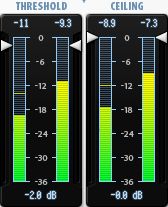
Here are the settings used with the Wave Arts FinalPlug plugin:

- "Threshold": -2 dB. The threshold is the level at which compression triggers to boost the signal. The -2 dB value chosen here is quite subtle, only boosting the signal by a maximum of 2 dB. The free Classic Master Limiter offers only this single adjustment, allowing you to set the threshold between -20 and 0 dB.

- "Ceiling": 0 dB. The ceiling is the maximum level the sound cannot exceed. In this case, any sound reaching within 2 dB of the maximum allowed bus volume is boosted by 2 dB but won't cross the ceiling. A 0 dB ceiling actually corresponds to the volume of the bus (or track) where the plugin is placed. Since the bus volume is -10 dB here, the actual threshold is -12 dB, and the actual ceiling is -10 dB.

Reverb

Here is the sound of the Lead Guitar bus processed with reverb.
You can only hear the effect of the reverb itself here.


(mp3 file)

I then set this reverb to 25% to achieve the desired effect.

Now that our lead guitars have passed through distortion, an amp head, and a cabinet, we'll add some "air" with a reverb plugin so the sound doesn't feel too cramped. I used WizooVerb, a plugin that hasn't been for sale for several years but still sounds great. It can still be found in the darker corners of the internet (I don't condone it, but you do as you wish), or you can use other paid or free reverb plugins. They are easy to find, and I suggest a few on this page. I commonly use SIR Convolution, which works with impulses, much like cabinet simulators. But instead of using cabinet impulses, we use room impulses recorded in various locations (from bathrooms to cathedrals, concert halls, or standard house rooms).

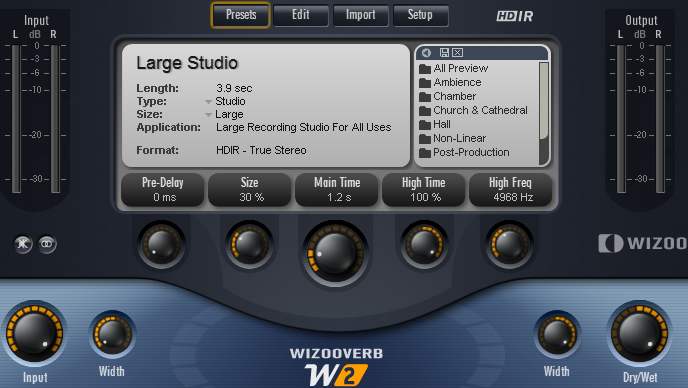
Here are the settings used with the WizooVerb plugin by Wizoo:

- I used the "Large Studio" preset (a versatile large recording studio). I reduced its "size" to 30% to avoid making it sound like a massive hall; the decay time is set to 1.2s and I adjusted the "Width" parameters so the reverb spreads across the stereo field. However, since the bus panning is set to 90% left, the reverb only propagates on the left side.

- The reverb amount is controlled with the "Dry/Wet" knob. At 0%, you hear no reverb at all; at 100%, you only hear the reverb without the dry signal. For lead guitar 1, it is set to 25%.

- Using reverb on a guitar is common practice. The dosage is a matter of personal preference, but too much reverb distances the instrument and can drown it in the mix.
WizooVerb Plugin
WizooVerb Plugin
- The lead guitar sound is now finalized for the mix. It will only be modified further during the final mastering stage.
FinalPlug Plugin
FinalPlug Plugin
W1 Limiter Plugin
W1 Limiter Plugin
Mixing in practice : Preparing the session | Bass | Drums | Rhythm guitars | Lead guitars | Synths | Vocals | Mastering
Haut de page
Top of page


MESSAGES

(leave a message)

Messages page # 1 2 3 4 5 6 7 8 9 10 11 12 13 14 15 16 17 18 19 20 21 22 23 24 25 26 27 28 29 30 31 32 33 34 35


aissa
le 27/01/2013 à 14h24

Bonjour,

Je suis chanteur de reggae et rappeur, j'aurais voulu connaître vos tarifs pour l'enregistrement de quelques titres à moi.

Je souhaiterais faire la prise de voix plus le mix.

Je suis habitué au studio. Faites-vous des tarifs à la journée ?

Cordialement.

* * * * * * * * * * * * * * * *

<em>Bonjour Aissa,

Merci de votre confiance, mais je ne suis pas un professionnel. Je n'ai pas de studio, simplement un home studio dans une pièce de mon appartement.
Je me contente de faire mes propres enregistrements, à l'occasion je bosse avec quelques potes pour leur filer un coup de main, mais ce n'est pas mon métier !
Et puis je n'ai jamais mixé de reggae ou de rap, alors je m'en voudrais de faire mal les choses dans un style que je ne maîtrise pas. Je vous conseille de vous tourner vers un studio pro spécialisé dans votre style, il doit être possible d'en trouver des pas trop chers.

Grebz</em>


Veji
le 22/01/2013 à 02h42

Which particular Redwirez impulses
1)which mic(sm57/r121/421 etc)
2)distance(0''/0.5''/1''/2'')
3)cap/cone capedge etc
are your favorites for distortion and clean?

Also do you use the bass with shb-1 w/impulses or without?

Thanks

* * * * * * * * * * * * * * * *

<em>Hello again Veji,

Concerning the SHB-1 bass amp sim, I find it very usable with and without impulses. Depends on the sound you want to get. The sound is brighter without impulses, deeper with impulses. It also depends on the tone you select on your bass when recording, on the settings you have in SHB-1 and on the impulse you pick.

I also sometimes don't use any amp sim for the bass track, leaving only the direct sound if it fits the song.

Or you can have one bass track with direct sound only, and a second bass track (a copy of the direct track) with an amp sim. Mixing the 2 can bring you the qualities of each, but it could also blur your bass sound. You need to try various possibilities and see (or hear) for yourself. Each song is different, so don't think you got it set once and for all. You probably need to make adjustments and try different combinations every time.

Now about the Redwirez impulses:
It's pretty damn difficult to tell you which impulses sound best. You probably won't use the same impulses if you play Metal songs or Rock'n Rollish songs. I am pretty sure that ACDC, Marilyn Manson, the Beatles, Oasis, Nirvana, Opeth, Metallica, Muse and Radiohead don't use the same gear.

It might be a good idea to try and find out what gear your favorite bands use and pick something similar, if that's their music genre you want to play.

As for me, I often use Vox AC30, because I love the Vox sound. That's my favorite.
But I also use Orange impulses, Engl Pro, Marshall 1960 as second choices.
Soldano, Bogner Uberkab and Mesa Rectifier from time to time.

For bass cabs, I try them all and change frequently. I don't have one favorite in particular. I have 4 impulse collections from Redwirez for bass: 2 Ampegs, Aquilar and Hartke cabs. They all have different qualities.

About the microphones and their positionning: most of the time, I use 2 impulses per guitar track.
My starting point is one R121 mic, CapEdge, 4'', and one SM57 mic, Cap, 0''. I found this combination to be pretty complementary, and it gives me a sound I'm immediately satisfied with. But it's not perfect every single time.
From that starting point, I will try to change the distances a bit until I find THE perfect combination (to my ears). Could be R121 at 2'' instead of 4, or CapOffAxis instead of Cap, etc.
It can be very time-consuming, it takes a bit of trials and errors, but if you want to reach your goal, that is to get THE sound you like, you have to go through this.

I also use my own impulses, particularly the Vox AC4 impulses, which sound pretty good, I'm proud :-)

Also note that the guitar you use will make a difference. My main guitar is a Fender Stratocaster, but a friend of mine lent me his Tokai Les Paul, and so my impulse settings need to be different, because these guitars sound different.

I also use Neumann U87 impulses, 421 or 414 mics... Really, I try a lot of things and it takes time.
Oh... and you have to try it in context. I mean, if you try various impulses while listening to your soloed guitar track, you will find a great sounding impulse combination, but when you play all the tracks together with all instruments, you will find that your combination doesn't sound so great anymore.

Have fun,

Grebz</em>


Chochel
le 20/01/2013 à 07h40

J'ai tenté L'UCG 102 Behringer + AC Box Combo soi-disant facile, résultat : pas un son... Énervé, j'ai découvert Studio de Grebz.

Ma question :
Est-ce que j'oublie l'UCG102 ?
Quel montage serait le plus aisé et le plus simple pour un premier essai ? Le combo Marshall ?

Par la suite, je tenterai des montages plus sophistiqués.

Cordialement,
JP


Veji
le 19/01/2013 à 15h50

Hi,
What are your top 5 best amp plugins and top 5 best cab impulses?
Also can you send me the recabinet 2... I can't find it anymore.
Thanks

* * * * * * * * * * * * * * * * *

<em>
Hi,

My favorite amp plugins for guitar are:
 - Ignite Amps' NRR1 (free product).
 - TSE's X50 (free product).
 - Kuassa's Amplifikation Creme (retail product), US$ 34. Only emulates one amp, but the sound you get is fantastic.
 - Overloud's TH2 (retail product), much more expensive - US$ 197 - but it emulates several real amps.

And for bass :
 - Ignite Amps' SHB1
 - Helian's 1st Bass or 2nd Bass (free products), which sound the same to me.

As for impulses, I use only Redwirez' impulses (retail products) which in my opinion are the ones that sound best of all the impulses I've tested so far. They're not free, but they're really unexpensive. The first cab impulses you buy will cost you US$9, then the more you buy, the more discount you get for the next impulses. And you can pick only the impulses you are interested in.

I cannot send you Recabinet's impulses, they are a discontinued retail product. They have been replaced by Recabinet 3, which cost only US$ 19.99 at the moment. That's quite a bargain, even though I think that Recabinet's impulses are not as good as Redwirez'. Your choice.

Finally, I am not sending any retail product to anyone. On my site, I make a large collection of free products available (amp sims, impulse loaders and impulses) for anyone to download, but I am not giving away any commercial products.

Cheers,
Grebz
</em>


Jak2112
le 08/01/2013 à 18h38

Salut !
Tout d'abord, félicitations et merci pour ce super site que je viens de découvrir et qui est très utile, notamment pour ceux qui débutent comme moi dans la MAO.
Donc en ce moment j'explore et je teste, mais j'ai un petit problème : je n'arrive pas à lire les extraits que vous proposez pour illustrer les différents plugins et logiciels ; le petit lecteur indique : Liste vide ! Peut-être ai-je oublié une manip en route ou autre ? Si vous pouviez m'aider ce serait super.
Merci d'avance et encore bravo !
Cordialement.
Jak2112

* * * * * * * * * * * * * * * *

<em>Bonjour, et merci !

En ce qui concerne le problème de lecture des extraits... il s'agit de lecteurs Flash, il peut donc y avoir des problèmes de compatibilité avec certains navigateurs.

De plus, si vous utilisez un système Apple, sachez qu'Apple a décidé (unilatéralement) de bannir Flash de ses machines, donc impossible de lire quoi que ce soit en Flash avec un iPad par exemple ou un iPhone. Pour les ordinateurs Mac, je ne sais pas trop, je n'ai pas eu l'occasion d'essayer, mais je crois avoir lu que c'était possible en téléchargeant le plugin Flash Player, comme sur PC. En ce qui concerne Linux, j'ai lu que seul le navigateur Chrome proposait la compatibilité Flash.

Entre parenthèses, il vaut mieux que vous soyez sur PC si vous comptez télécharger des choses sur mon site, parce que je ne propose que des plugins pour PC. Je suis moi-même utilisateur PC, donc je ne connais pas l'univers Mac ou Linux. Rien de sectaire, mais je suis un simple particulier, je ne peux pas m'occuper de tout, donc je m'occupe de ce que je connais uniquement ! Mais utiliser un Mac pour faire de la MAO est une excellente chose, aucun doute là-dessus. Après, tout est question de préférence et d'affinités. Fin de la parenthèse.

Si vous êtes sur PC avec Windows, il n'y a pas de raison que vous ne puissiez pas lire les extraits, à moins que votre navigateur Internet soit trop ancien, donc pas à jour ou incompatible, mais tous ceux que je connais fonctionnent bien. J'ai testé avec Internet Explorer, Chrome, Firefox, Opera et Safari, et mon site fonctionne bien avec chacun d'entre eux.

Ce que je vais faire, c'est essayer de proposer systématiquement de télécharger les extraits sonores en version mp3, ce qui permettra à tout le monde de pouvoir quand même les écouter même lorsque le lecteur Flash ne fonctionne pas. Il va me falloir un peu de temps pour mettre tout ça en place, mais je vais le faire rapidement, promis.

Grebz</em>

Top of page