Messages | Version française |


? | Home page | Tutorial | Mixing in practice | Mixing preparation

Site de Grebz
Home page


PREPARING MIXING

Reminder: we are working on the song Life, an original composition:


(mp3 file)

What software and hardware do we need to produce this song? What is the instrumentation? How is the project organized?

Here is the list of everything I used to record and mix Life:

- A reasonably powerful computer
- An audio interface
- A preamp (optional if the audio interface already has decent built-in preamps)
- A vocal microphone
- A mic stand
- A pop filter
- Monitoring speakers
- Headphones
- A MIDI controller (master keyboard)
- A guitar
- A bass guitar
- All necessary cables

- A sequencer (DAW)
- Effect plugins (EQ, reverb, compression, saturation, etc.)
- Amp simulation plugins
- Impulse loaders (IR loaders)
- Impulses (IRs)
- Software synths (VSTi)
- Drum software

THE TRACKS

- 4 synth tracks
- 2 clean rhythm electric guitar tracks
- 2 distorted lead electric guitar tracks
- 1 bass track
- 1 vocal track
- 2 backing vocal tracks
- 2 sampled choir tracks (orchestral and choral sound plugin)
- Drums

Each instrument track contains its own plugins. Previously, I used to create buses for every track and place the plugins on those buses, but despite the organizational logic, it made tasks more complicated and significantly slowed down the projects. I now opt for a simpler method.

Don't hesitate to create a blank template containing all the tracks and buses you need; this saves you from rebuilding everything for every new project. I describe the template I use on this page.

One last point: the song has a tempo of 75 BPM.

THE BUSES

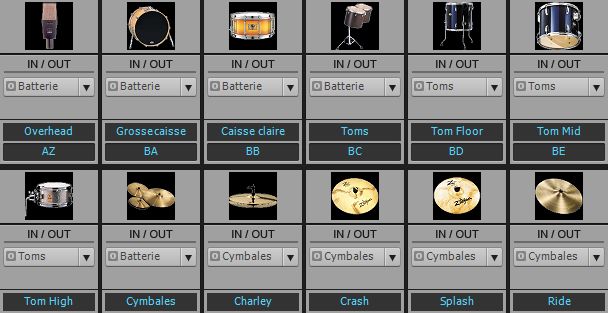
For the drums
- Each element will have its own bus (kick, snare, hi-hat, ride, etc.), on which various sound processing plugins will be placed (EQ, compression).
- These buses will be routed to a main drum bus.
Life - Drum bus
Drums
Main group buses
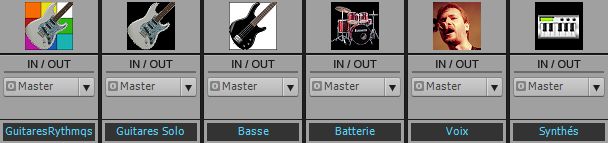
- Each type of instrument is routed to a main bus: the rhythm guitars (2 in this case) are routed to a "Rhythm Guitars" main bus, all synths to a "Synths" main bus, etc.
- Each of these main buses is then routed to the Master bus.
Life - Main buses
Main buses

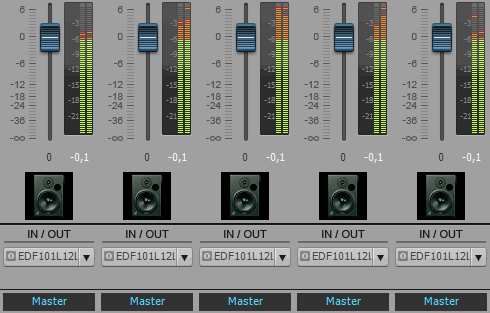
The Master Bus
- The "main" buses for each instrument group are routed here: the rhythm guitar bus, the lead guitar bus, the synth bus, the vocal bus, the bass bus, and the drum bus.
- The mastering plugins are placed on the Master bus: a multi-band EQ and a limiter to achieve the final sound.
Life - Master bus
Master bus

Don't worry if this all seems a bit messy or complicated at first; we'll go through the details step by step—it’s not rocket science at all.

Mixing in practice : Preparing the session | Bass | Drums | Rhythm guitars | Lead guitars | Synths | Vocals | Mastering
Haut de page
Top of page


MESSAGES

(leave a message)

Messages page # 1 2 3 4 5 6 7 8 9 10 11 12 13 14 15 16 17 18 19 20 21 22 23 24 25 26 27 28 29 30 31 32 33 34 35



Gil
le 21/11/2010 à 12h44

Excellent site, merci pour toutes ces infos.


Marcus
le 20/11/2010 à 21h04

Super site, vraiment bravo, mais j'ai un problème, peut-être que je suis trop novice mais j'arrive pas à utiliser ce que je télécharge (fichier dll), pouvez-vous m'éclairer. Merci.


* * * * * * * * * * * * * * * * * * *

<em>D'abord, je précise que tous les téléchargements que je propose sont pour PC sous Windows uniquement, pas pour Mac ou Linux.
Ensuite, les fichiers DLL doivent être placés dans un répertoire "VST". Soit un répertoire déjà existant qui a été créé lorsque vous avez installé votre séquenceur, soit un répertoire que vous créez vous-même où vous le souhaitez. Dans tous les cas, il faudra indiquer dans les options de votre séquenceur quel est le(s) répertoire(s) où se trouvent vos VST.
Pour cela, ça dépend des séquenceurs. Dans Sonar (le séquenceur que j'utilise), il faut aller dans "Options", "Global", puis l'onglet "Plug-ins VST" : c'est là qu'on peut ajouter le(s) répertoire(s) où l'on range ses plugins.
Ensuite, si le séquenceur ne le fait pas automatiquement au démarrage, il faut lui indiquer de scanner les VST présents sur votre disque dur afin qu'ils soient pris en compte et ajoutés à la liste des plugins que vous pouvez utiliser dans vos projets. Là encore, la façon de faire dépend du séquenceur utilisé, mais je suppose que le principe est toujours le même.

Grebz</em>


JPR33
le 16/11/2010 à 17h50

Ton site est une mine d'informations !
Bravo


JC
le 15/11/2010 à 11h55

Super site, très instructif.
Bravo,

JC


crisdalsace
le 21/10/2010 à 16h54

Bravo et encore BRAVO.

Salutations,
Crisdalsace

Top of page