
 |
|
? | Home page | Tutorial | Mixing in practice | Vocals
|


Let's see how to process the different types of vocals, including volumes, panning, and plugins...

Mono audio track
Panning: Center
Volume: 0 dB
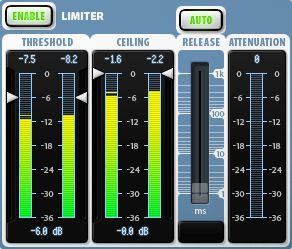
Plugin: Limiter
Destination: "Dry Lead Vocals" bus
Source: Lead vocal recording track
Destination: "Lead Vocal Reverb" and "Lead Vocal Delay" buses
Panning: Center
Volume: -23 dB.
Source: "Dry Lead Vocals" bus
Destination: "Lead Vocals" bus
Panning: Center
Volume: -6 dB.
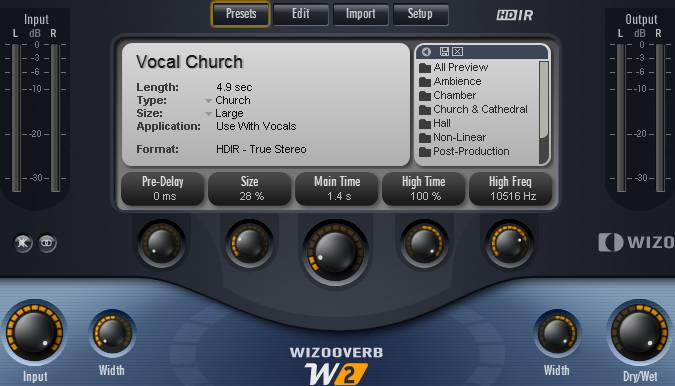
Source: "Dry Lead Vocals" bus
Destination: "Lead Vocals" bus
Panning: Center
Volume: 0 dB

Source: "Dry Lead Vocals", "Lead Vocal Reverb", and "Lead Vocal Delay" buses
Destination: Main Vocal bus
Panning: Center
Volume: -5 dB
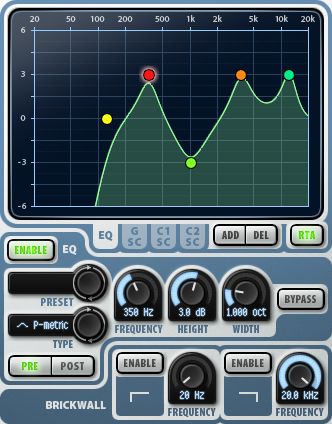
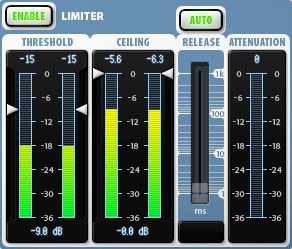
Mono audio tracks
Panning: Center
Volume: 0 dB
Destination: The 1st track is routed to the "Dry Backing 1" and "Backing 1 Reverb" buses; the 2nd track is routed to the "Dry Backing 2" and "Backing 2 Reverb" buses
Sources: Backing 1 and Backing 2 tracks
Destinations: "Backing 1" Bus and "Backing 2" Bus
Panning: Center
Volumes: 0 dB
Sources: Backing 1 and Backing 2 tracks
Destinations: "Backing 1" Bus and "Backing 2" Bus
Panning: Center
Volumes: -6 dB
Sources: "Backing 1 Reverb" and "Backing 2 Reverb" buses
Destinations: Main Vocal bus
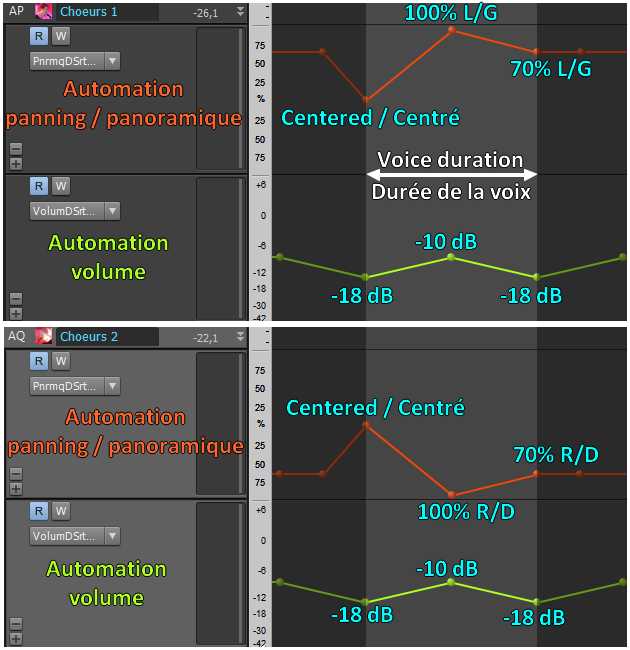
Panning: Variable, set by different automation on the two buses. Mostly 70% left for Backing Vocal 1 and 70% right for Backing Vocal 2.
Volumes: Variable, set by different automation on the two buses. Mostly at -10 dB.
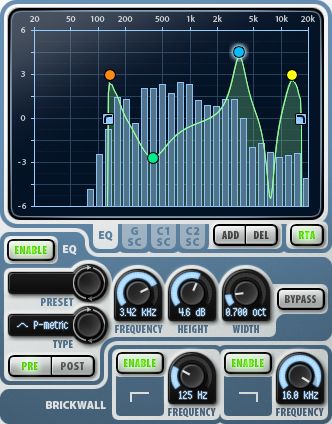
Plugins: an equalizer and a limiter on each bus
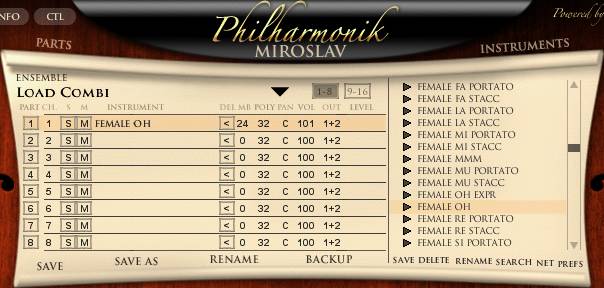
Mono MIDI tracks linked to tracks
Panning: Center
Volume: 0 dB
Destination: The first track is routed to the "Phil Choir 1" bus; the second track is routed to the "Phil Choir 2" bus
Sources: "Philharmonik 1" and "Philharmonik 2" tracks
Destination: "Philharmonik Choir" Bus
Panning: Variable, set by different automation on the two buses.
Volume: Variable, set by automation that changes from time to time throughout the song.
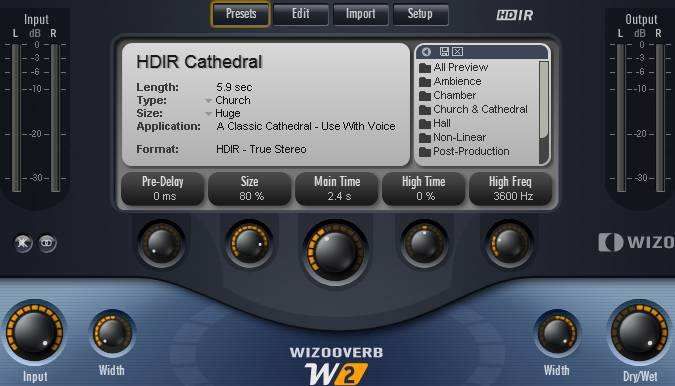
Plugins: Reverb
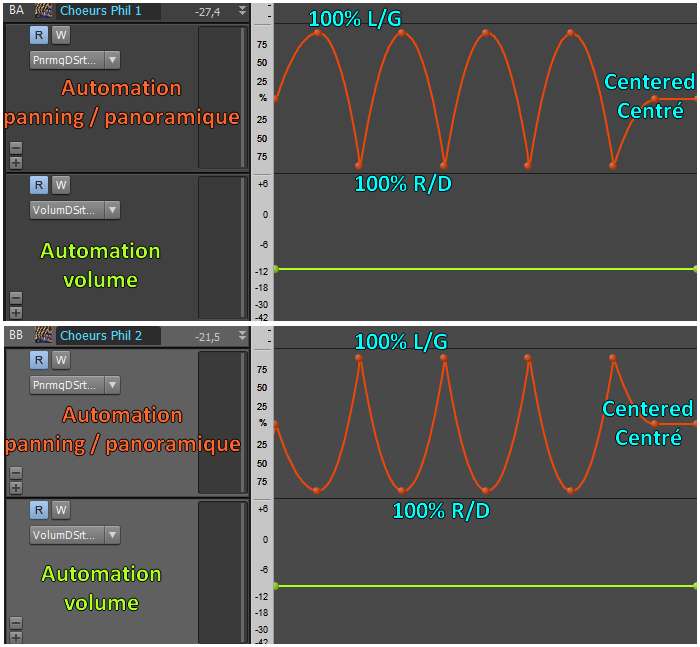
Sources: "Phil Choir 1" and "Phil Choir 2" buses
Destination: Main Vocal bus
Panning: Center
Volume: 0 dB.
Plugins: an equalizer
Sources: "Lead Vocal" bus, "Backing 1" and "Backing 2" buses, "Philharmonik Choir" bus
Destination: Master Bus
Panning: Center
Volume: -7 dB.
Plugins: None
Messages page # 1 2 3 4 5 6 7 8 9 10 11 12 13 14 15 16 17 18 19 20 21 22 23 24 25 26 27 28 29 30 31 32 33 34 35
karjim
le 15/06/2012 à 10h27
Salut Grebz,
Déjà un grand merci pour ton site, qui m'a bien aidé a rentrer dans le monde du VST freeware.
Je travaille sur un album de métal moderne, j'enregistre les guitares en ce moment. Je les veux brillantes chaleureuses et bien serrées. Entre Gojira et Nevermore un peu :)
J'aurais quelques conseils à te demander.
1) J'utilise Lecab 2 avec les free impulses dispo sur ton site. Penses-tu qu'il vaille mieux utiliser un pack impulse (ex 4 impulses Catharsis) par piste ou plutôt tenter de mixer un peu de tout pour chaque piste gratte. Le principe d'un pack impulse d'un cab n'est-il pas d'utiliser le max de prises mics dispo dans le pack (6 au max avec lecab 2) ?
2) Que penses-tu du Warmifier de Voxengo ? Je ne trouve pas de keygen valable mais ayant testé la démo, le son s'embellit vraiment (d'ailleurs si t'as un lien je suis preneur).
Je me pose la question de sa position dans la chaine. Voici la mienne :
Tubescream + LePou LE456 + Warmifier + LeCab 2
Qu'en penses-tu ? Dois-je le mettre ailleurs ?
3) Des packs impulse gratuits à me conseiller parmi cette liste exhaustive pour du métal tight ? Pour l'instant j'utilise Catharsis et Orange 412... pas mal.
Je ne comprends pas d'ailleurs certaims pack se nomment JJpowertube ? je pensais que les impulses n'étaient que des prises mics sur des cabs ? Il existe des impulses de lampes d'ampli ? Si oui, comment ca marche et est-ce bien nécessaire ?
Un grand merci à toi d'avance pour le temps que tu m'auras consacré, et longue vie à ton site !
* * * * * * * * * * * * * * * *
<em>Je voulais faire une réponse pas trop longue mais... raté :-)
1)
Le but n'est pas d'utiliser toutes les impulsions d'un même pack mais de simuler une prise réelle.
Autrement dit, on va chercher à imiter ce qui se pratique pour une prise de son en studio, avec de vrais amplis et de vrais micros.
Bien souvent, une prise sera faite en plaçant entre 1 et 3 micros devant l'ampli. Le placement des micros est tout un art. Une différence de placement de quelques centimètres (voire millimètres) va faire la différence entre le son qu'on recherche et un son désagréable à l'écoute. Quand on utilise plusieurs micros, on peut aussi rencontrer des problèmes de phase (le son de deux micros joués ensemble va se voir amputé de certaines fréquences, ce qui rend le son plus pauvre qu'il ne devrait).
Pour avoir un gros son, on peut multiplier les prises pour les superposer. C'est à dire jouer plusieurs fois la même chose sur plusieurs pistes. Pour que l'effet soit réussi, il faut que les différentes prises soient aussi proches que possible les unes des autres. Il faut vraiment essayer de jouer pareil d'une prise à l'autre. Mais même les meilleurs ne peuvent jouer exactement pareil d'une prise à l'autre, et tant mieux, car ce sont les petites différences qui créent cette impression de richesse. En revanche, si les prises sont trop différentes et décalées, ça devient brouillon et bordélique.
Remarque : multiplier les prises, c'est bien, mais plus il y a de prises, plus ça complique le mixage. C'est quand même plus simple de mixer un enregistrement chant/guitare sur 2 pistes, plutôt qu'un projet avec 12 guitares, une basse, une batterie avec 15 fûts, 2 chanteurs, 20 voix de chœurs, 5 synthés et un orchestre philharmonique derrière ! Arriver à faire en sorte qu'on distingue bien chaque élément dans un tel mix n'est carrément pas évident.
Maintenant, et c'est particulièrement vrai avec des simulateurs parce que c'est facile à mettre en œuvre, rien n'empêche de s'affranchir de la réalité et de laisser libre cours à son imagination. À partir du moment où on obtient un son dont on est satisfait, peu importe que ce soit possible ou non dans la réalité. Mais à mon avis, il faut faire attention de ne pas tomber dans le syndrome "j'ai 250 impulsions dans ma collection, je vais toutes les utiliser parce que je peux". LeCab 2 permet d'utiliser 6 impulsions simultanément, ça ne veut pas dire qu'il faut absolument les utiliser toutes systématiquement. Il ne faut le faire que si le résultat en vaut la peine, mais il faut savoir aussi reconnaître lorsque seulement 2 ou 3 impulsions suffisent à obtenir le son recherché. 'Plus' n'est pas égal à 'mieux'. Pas forcément en tout cas.
Personnellement, j'utilise dans 95% des cas 2 impulsions par piste de guitare. En général, un micro dynamique et un micro statique combinés. Et pour grossir le son, je vais doubler les pistes de guitare, non pas en faisant un copier/coller d'une piste enregistrée, mais en rejouant complètement sur une nouvelle piste et en faisant attention que les 2 pistes aillent bien ensemble.
2)
Je n'ai jamais essayé le Warmifier de Voxengo. Donc pas d'avis là-dessus.
En revanche, j'utilise de temps à autre le Tube Amp de Voxengo, qui est gratuit et téléchargeable sur le site de Voxengo. C'est une simulation d'overdrive à lampe qui permet de réchauffer le son. Je le trouve très bon : on peut le régler de façon à simplement ajouter un peu de couleur au son, ou bien carrément ajouter une disto (overdrive) à une piste. Ça marche sur les guitares bien sûr, mais aussi sur la basse, et même sur des voix. J'ai constaté que ce plugin gratuit permettait d'obtenir des résultats assez proches du Tube Saturator de Wave Arts (vraiment excellent mais qui coûte 100 euros).
Quant au placement dans la chaîne d'effet, il serait logique de placer ce type de plugin en fin de chaîne. Dans ton exemple, je le placerais après le LeCab 2, de façon à ce qu'il réchauffe le son complet. Encore une fois, le principal est que ça sonne bien et surtout que ça te plaise à toi. Si tu trouves le son meilleur tel que tu l'as placé, laisse-le où il est. Les règles sont faites pour être transgressées !
3)
Je ne sais pas trop ce qu'il en est des impulsions Power Tube. En effet, je ne sais pas comment on peut faire des impulsions à partir de lampes... Tout ce que je peux dire, c'est que quand j'ai fait des impulsions personnelles, le fait d'activer ou non la disto (donc de faire chauffer les lampes) n'avait aucune influence sur l'impulsion obtenue au final. Avec ou sans lampe active, l'impulsion ne change pas, comme si l'opération de convolution effaçait les caractéristiques de la distorsion pour ne garder que le caractère intrinsèque du cab...
Quant à te conseiller telle ou telle impulsion...
Je mets à disposition des impulsions gratuites que j'ai collectées sur le net, de façon à en rendre un maximum facilement disponibles en un seul endroit... mais je ne les utilise pas moi-même ! En fait, j'ai acheté des impulsions chez Recabinet et Redwirez, avec d'ailleurs une forte préférence pour Redwirez.
Les impulsions de Redwirez sont d'excellente qualité, basées sur des cabs réputés. Pour chaque cab, une bonne quinzaine de micros différents sont utilisés, et chaque micro propose une cinquantaine d'impulsions différentes, chaque impulsion correspondant à un emplacement différent. Le tout est bien classé, bien nommé, donc c'est moins le bordel pour s'y retrouver et on sait exactement à quoi on a affaire. D'ailleurs, il y a tellement d'impulsions qu'on peut même perdre un temps fou à essayer des tas de combinaisons différentes.
L'avantage de Redwirez, c'est qu'on peut acheter séparément les impulsions des cabs. Si tu ne veux que le cab Orange, tu n'es pas obligé d'acheter le reste. Un cab, c'est 9 dollars (environ 7 euros) et les taris sont dégressifs. Si tu achètes plus de 25 cabs, les derniers ne coûtent plus que 1 dollar ! La collection complète, c'est 125 dollars, ce qui n'est pas donné, mais si tu n'as besoin que de 6 cabs différents par exemple, ça te revient à 40 dollars (environ 30 euros). Bon voilà, moi je n'ai pas d'actions chez eux, mais je trouve que leurs impulsions sont vraiment au-dessus du lot.
Grebz</em>
Masteurdem
le 11/06/2012 à 02h15
Besoin d'aide au sujet du bus. J'utilise acid pro 7.
Je travaille comme ça :
Une piste pour l''instrumental,
Plusieurs pistes pour la voix et des effets par piste pour chaque voix.
Donc j'aurais aimé savoir s'il faut mettre un bus pour l'instrumental et comment procéder ?
Faut-il faire pareil pour les pistes voix et y a-t-il moyen de bien me l'expliquer ?
Je n'arrive pas à utiliser de bus je vois pas comment faire.
* * * * * * * * * * * * * * * *
<em>Bonjour Masteurdem,
Je n'utilise pas Acid Pro, mais l'interface est assez semblable à un autre logiciel de Sony que j'utilise : Vegas Pro. C'est un logiciel de montage vidéo, donc ça n'est pas vraiment la même chose, mais on retrouve le même concept de pistes (vidéo, audio) et de bus pour l'audio.
Avec Acid, il n'y a pas de vidéo mais il y a des pistes audio, des pistes midi et des bus.
- Pistes audio : elles contiennent des données audio mono ou stéréo. Ces données peuvent être des choses que tu enregistres toi-même avec un micro ou en branchant un instrument (voix, guitare, synthé...), ou bien des samples (des fichiers audio que tu insères sur la piste).
- Pistes midi : elles contiennent des informations sur des notes, mais pas de son. Elles indiquent le type de notes, leur durée, leur volume, leur hauteur, mais pour produire un son, il faut que la piste midi soit liée à une piste audio. Sur la piste audio liée à la piste midi, il faut placer un VSTi (un instrument virtuel) qui peut être un synthé, une batterie électronique, etc. Les notes de la piste midi joueront donc avec l'instrument placé sur la piste audio associée.
- Bus : les bus ne contiennent pas de données. Pas d'audio, pas de données midi. En fait, les bus servent à regrouper les pistes, ou bien à placer des effets qui sont communs à plusieurs pistes.
Par exemple : tu as 5 pistes de voix. Tu peux créer un bus "Voix" et diriger (on dit aussi "router") tes pistes de voix vers le bus "Voix". Et ensuite, sur le bus "Voix", tu peux mettre une réverb, un égaliseur ou n'importe quel effet. Toutes les pistes qui sont routées vers le bus "Voix" utiliseront alors les effets du bus. Au lieu de mettre 5 fois la même réverb sur les 5 pistes de voix, tu n'utiliseras qu'une seule réverb. Étant donné que chaque effet utilisé consomme un peu de la puissance du processeur, moins tu auras d'effets, moins tu utiliseras de puissance.
Ce n'est pas obligatoire, et ça ne marchera pas si tu as besoin d'effets différents sur chaque piste de voix. Dans ce cas, il vaut mieux placer des effets directement sur les pistes.
Mais un bus reste pratique. Si tu routes toutes tes pistes de voix vers le bus "Voix", alors tu pourras mettre en Mute ou en Solo toutes les pistes de voix d'un seul coup avec le bus "Voix". Tu peux aussi monter ou baisser le volume de toutes les voix ensemble grâce au bouton de volume du bus.
Alors comment créer un bus ?
D'après les vidéos que j'ai pu voir, les bus se trouvent dans la console de mixage (mixing console). Tu peux insérer un nouveau bus et lui donner le nom que tu veux.
Ensuite, il faut que tu indiques à tes pistes (de voix par exemple) de se dirigers vers le nouveau bus de voix que tu as créé. Sur chaque piste de voix, tu cliques sur le bouton approprié. Je crois que c'est le carré avec un point au milieu. En cliquant dessus, une liste des bus va apparaître et tu choisis le bus que tu veux.
Même chose dans les bus : tu peux router un bus vers un autre bus.
Le plus simple est de router tes pistes de voix vers un bus "Voix", tes pistes de batterie vers un bus "Batterie", tes pistes de guitares vers un bus "Guitares", etc.
À toi de voir selon tes besoins.
Et les bus sont en général tous routés vers le bus "Master" (dans Vegas, en version française, il s'appelle "Matrice"). Le bus "Master" est le bus qui envoie le son vers ton interface audio (ta carte son) et donc vers tes enceintes.
Est-ce qu'il faut absolument utiliser des bus ?
Non, ce n'est pas obligatoire. Si tu n'as qu'une seule piste instrumentale, il n'est pas utile de créer un bus. L'intérêt des bus, c'est de pouvoir regrouper plusieurs pistes qui contiennent le même type d'audio (les voix, les guitares, les batteries, les synthés...). Comme je le disais, ça sert soit à pouvoir faire un réglage général de toutes les pistes du même type d'un seul coup (volume, panoramique, mute, solo, automation), soit d'appliquer un même effet VST à toutes les pistes du même type.
C'est pratique, et en utilisant des effets sur les bus, au lieu de mettre plusieurs fois le même effet sur plusieurs pistes, ça permet d'économiser des ressources processeur.
Mais tu peux aussi très bien ne pas utiliser de bus du tout. C'est plutôt une question d'organisation.
Grebz</em>
Lag
le 29/05/2012 à 15h46
Bonjour, j'ai traduit la documentation du simulateur d'enceinte Recabinet 3.
Puis-je la mettre sur votre site pour en faire profiter vos lecteurs ?
Bravo pour votre site.
* * * * * * * * * * * * * * * *
<em>Pourquoi pas ?
J'ai moi même acheté ce logiciel et... je n'ai pas été convaincu du tout. Mis à part le fait que l'interface est relativement conviviale, je n'ai pas vu d'avantage à utiliser Recabinet 3 par rapport à un LeCab 2 de Poulin, qui est gratuit. Du coup, je regrette un peu son achat, même si à 20 euros, je ne me suis pas ruiné !
Mais bon, les goûts et les couleurs...
Je vous contacte par e-mail pour récupérer votre traduction.
Grebz</em>
pyro20
le 15/05/2012 à 15h59
J'aimerais savoir quel logiciel tu me recommandes pour créer des mix plus dans la hard tech, de préférence un logiciel simple avec des sons pré-enregistrés et des petit truc drôles (voix de dessin animé, bruit, etc.)
Merci d'avance.
* * * * * * * * * * * * * * * *
<em>
A priori, n'importe quel séquenceur permet de faire n'importe quel type de musique. Même si je n'y connais pas grand-chose en hard tech, j'ai pu voir que les noms des logiciels Reason ou FL Studio (Fruity Loops) reviennent souvent parmi les amateurs de musique électronique.
Voici deux liens vers des forums Audiofanzine qui en parlent justement :
<a href="http://fr.audiofanzine.com/techno/forums/t.230259,quel-logiciel-pour-de-la-techno-minimale.html" target="_blanck">celui-ci</a>, et <a href=http://fr.audiofanzine.com/logiciel-dj/forums/t.173449,logiciel-pour-creation-musique-techno.html" target="_blanck">celui-là</a>.
Quant aux bruitages, je doute qu'aucun séquenceur, qu'il soit orienté techno ou autre inclut ce genre de choses. Beaucoup de logiciels incluent des VSTi (synthétiseurs logiciels), mais ce seront des sons de synthés, pas des bruitages. En revanche, tu trouveras sur le Net des sites spécialisés dans les bruitages à télécharger en tous genres, y compris des téléchargements gratuits. Tape "Bruitages gratuits" dans Google et tu devrais trouver ces sites.
Grebz</em>
Cyril All You Bring
le 10/05/2012 à 10h31
Hey !
Je suis déjà venu te poser quelques questions il y a quelques temps, et comme tes réponses sont pertinentes, je me permets de t'en poser de nouvelles !
J'ai un enregistrement batterie enregistré en studio (en une seule piste, c'est pour une démo), donc un son brut sans aucun traitement...
Si j'enregistre mes guitares et basse à la maison via un UX2 de chez line6 et POD Farm, le son de celles-ci sera pré-traité non ?
En gros sera-t-il possible de réaliser un petit mixage et mastering correct en alliant les 2 procédés ?
Pourrais-je avoir un résultat homogène ou suis-je contraint d'enregistrer mes guitares en studio également (ce que j'aimerais éviter !) ?
* * * * * * * * * * * * * * * *
<em>Bonjour Cyril,
Sur le principe, je ne vois pas d'empêchement à mélanger les 2 procédés : enregistrement de la batterie en studio, les instruments à la maison...
Inconvénients prévisibles :
- "L'atmosphère sonore", c'est à dire l'acoustique de la pièce où la batterie a été enregistrée, sa réverbération naturelle qui a forcément été captée par les micros (si on parle bien d'une batterie acoustique). C'est ce qui sera sans aucun doute le plus difficile à rendre cohérent avec le reste des instruments. Il va falloir faire en sorte qu'on ait l'impression que les guitares ont été enregistrées dans le même espace que la batterie en jouant avec des réverbs bien choisies. Si la batterie enregistrée en studio a un son vraiment brut, sans réverb naturelle trop audible, ce sera d'autant plus simple et tu pourras alors appliquer des réverbs batterie et guitares qui iront bien ensemble.
- Une seule piste pour la batterie. Si c'est une piste stéréo, les éléments de la batterie sont déjà positionnés dans la panoramique. Mais comme c'est une piste unique, il sera un peu plus compliqué de la mixer. Difficile par exemple d'appliquer une compression globale, puisque la compression de la grosse caisse n'est pas la même que celle de la charley par exemple. Idem pour l'égalisation : on ne traite pas de façon identique une caisse claire et une ride. Il faudra donc appliquer une compression et une égalisation "moyennes" sur la batterie dans son ensemble. À moins que la prise de son ne soit nickel, qu'il n'y ait rien à retoucher au niveau compression/égalisation. Dans ce dernier cas (idéal), il ne restera qu'à trouver une bonne réverb à appliquer, qui se marie bien avec le reste des instruments.
Dans tous les cas, il s'agit d'une démo, donc le but n'est pas de proposer un morceau parfait, prêt à passer à la radio ! L'objectif est de faire au mieux, avec les limitations inévitables, pour obtenir un morceau agréable à écouter qui donne envie d'écouter le groupe en live par exemple, parce que la prestation est convaincante.
D'autre part, le problème de cohérence ne vient pas du fait que la batterie ait été enregistrée en studio. C'est même plutôt positif car les studios ont généralement une acoustique sensiblement meilleure que d'autres lieux. Ça pourrait être plus problématique si elle avait été enregistrée dans un garage ou le salon d'un pavillon qui résonne de partout !
C'est aussi un problème qu'on peut rencontrer avec des logiciels de batterie. Les samples utilisés sont enregistrés en studio, et même s'ils sont aussi bruts que possible, il n'empêche que la prise de son est effectuée ailleurs que le reste des instruments. C'est ce que j'utilise moi comme méthode, et ça ne m'a jamais posé de problème particulier. La différence est que je traite indépendamment chaque élément de la batterie pour l'égalisation et la compression, ce qui apporte un surcroît de contrôle sur le son. Est-ce que j'obtiens pour autant un meilleur son, je n'en sais rien, mais j'ai la possibilité d'influer sur tous les éléments, et c'est ensuite mon talent (ou mon absence de talent) qui va me permettre de faire la différence entre un son pourri, un son correct, ou un son qui déchire sa maman :-)
En résumé, vas-y, fonce et fais-nous partager ton morceau quand il sera terminé (si tu le souhaites) !
Grebz</em>